I Built a Pixel-Art Office to Manage My AI Agents
What happens after your fourth agentic CLI tab, and the weird side project it led to.
I run a lot of coding agents now. Claude Code in one terminal, Copilot CLI in another, Codex in a third. One is great, two is fine, and somewhere around the third or fourth tab it falls apart.
The problem isn’t the agents, which are doing their work. The problem is me. I lose track of which one is running, which one finished and is sitting idle waiting for me, which one is blocked on a question, and which one quietly went off the rails ten minutes ago while I was looking at a different tab. I’d cycle through terminals like a short-order cook who forgot which orders are up. The information is all there; it’s just spread across a stack of identical black rectangles with no sense of place.
At some point I realized the terminal is a bad interface for managing a team. It’s great for talking to one process and terrible for keeping a dozen of them in your head at once.
So I made them an office instead.
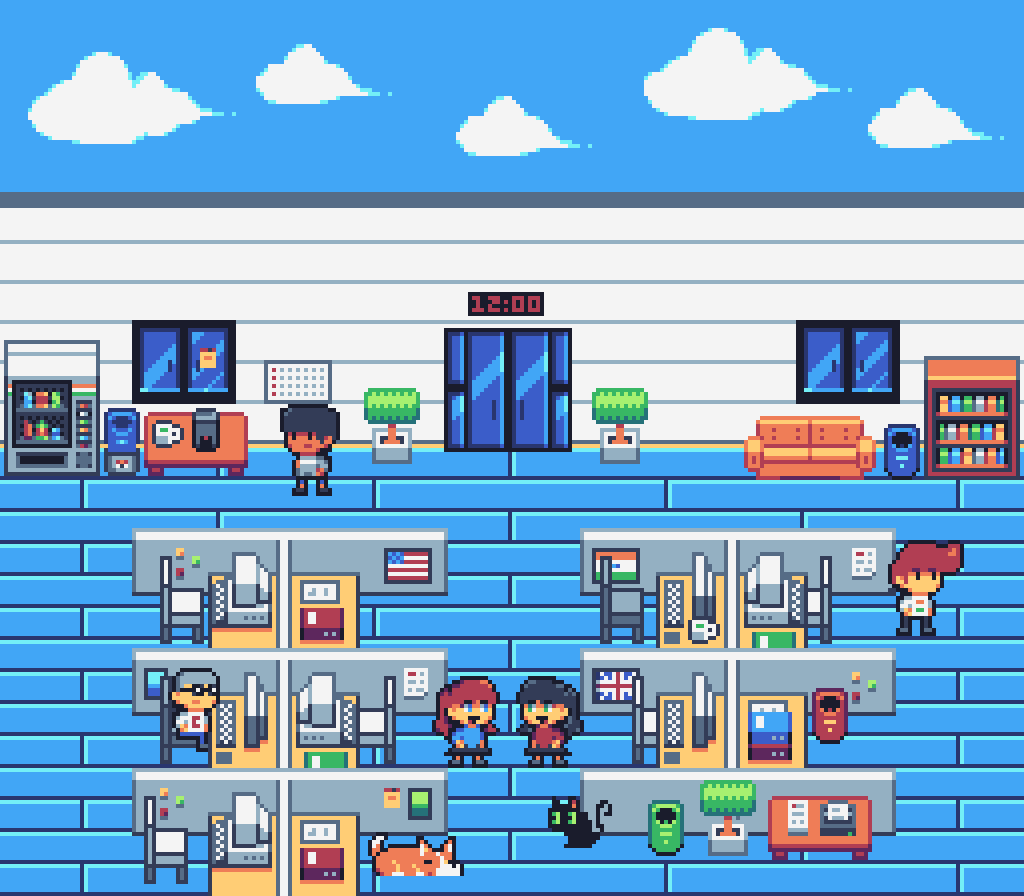
Spawning agents, assigning a task, and watching them work. Each one a real CLI process.
AIOffice is a pixel-art office where each AI agent is a character at a desk. You spawn one, walk over, hand it a coding task, and watch its terminal output as it works. Every character is a real CLI process running locally in a PTY: Claude Code or Copilot CLI, using the auth you already have. You can chat with them like NPCs, and hire, reset, or delete them from the UI or a CLI.
The part that surprised me is how much the spatial layout helped. When agents are people in a room instead of tabs in a stack, “who’s idle, who’s stuck, who’s done” becomes something you can see at a glance rather than something you reconstruct by tabbing around. The idle agent is just… standing at their desk, where you can’t miss it.
Under the hood it’s three pieces: a Phaser 3 + TypeScript frontend for the office itself, an Express server that manages the PTY processes and bridges their JSONL output over WebSockets, and a CLI for scripting the whole thing. It runs entirely on your machine, with no external services beyond the AI CLIs you’ve already installed.
I’ll be honest that it’s partly a toy. There’s background music. Half the point was that it’s fun to look at. But it came out of a real annoyance, and building it left me with a genuine suspicion: the right interface for managing a team of agents probably isn’t a terminal at all. We’ve spent two years making the agents better and almost no time making the thing we use to watch them better.
Code’s here if you want to poke at it: github.com/ChristianFJung/AIOffice.