Designing a CLI for AI Agents
The heaviest users of my command-line tools turned out to be AI agents. Here's what I changed once I noticed.
I noticed the mismatch while watching an AI agent use paperctl, a small command-line tool I built for tracking academic papers. I’d asked it to organize a few papers, and it called paperctl show in a loop, once per paper, spawning a fresh process every time. Each call reloaded the config, opened the database, did its one lookup, and tore everything down. It was using the tool exactly as written, and it was using it badly, because I had built the tool for a person who looks up one paper at a time, and the thing driving it was not a person.
AI agents (LLMs that run tools on their own to accomplish a task) are becoming the heaviest users of command-line tools. They invoke a CLI many times in a session, read every line of output, and chain commands in ways the author never pictured. They also read your --help more carefully than any human will. They are already using your tools this way, whether or not you designed for it.
The useful realization, which I first saw argued by Peter Steinberger, the founder of OpenClaw, is that you usually don’t need to build anything new for this. No separate API, no MCP server (the Model Context Protocol, a standard way to wire tools into agents), no per-framework integration. Your CLI is already an agent interface. It just isn’t a good one yet. A few changes fix that, and most of them make the tool better for humans too.
Put structured output on everything
The highest-leverage change is --json on every command that returns data.
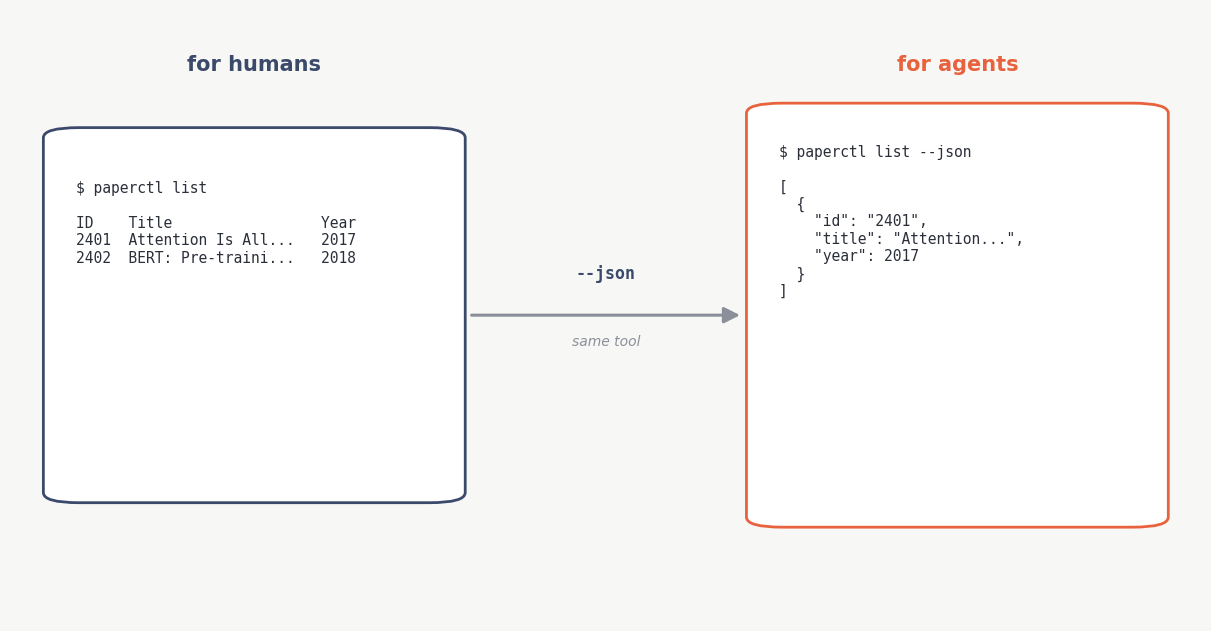
A person running paperctl list wants a table: aligned columns, a truncated abstract, maybe some color.
$ paperctl list
 ID    Title                                    Year
 2401  Attention Is All You Need                2017
 2402  BERT: Pre-training of Deep Bidirect...   2018
An agent wants the same data in a form it can parse without guessing where a column ends or hoping no title contains a tab.
$ paperctl list --json
[
  { "id": "2401", "title": "Attention Is All You Need", "year": 2017,
    "authors": ["Vaswani", "Shazeer", "Parmar"], "abstract": "The dominant..." }
]
The human gets the table by default and never sees JSON unless they ask. The agent passes --json and gets something it can actually consume. This is the primary interface for agents, and it is also just better for shell scripts.
Let commands take more than one input
Back to that loop. An agent loops by default, so if your command takes one ID at a time, every agent that touches it pays the worst access pattern there is: spawn, load, do one thing, tear down, repeat.
So show takes as many IDs as you give it:
$ paperctl show 2401 2402 2403 --json
One process, one config load, one database connection, all the results in one array. For any tool with real startup cost (auth, config, runtime init) this is the difference between usable and painful.
Write an AGENTS.md, and lead with usage
Agents read a file called AGENTS.md at the root of the repo. Most people fill theirs with contribution guidelines: linting, code style, how to run the tests. But the agent reading your repo is usually trying to use the tool, not contribute to it. So usage goes first: what commands exist, what they return, and how to get the most data for the least work. Contribution notes can go below.
Flag the commands that cost money
If your CLI wraps an LLM, some commands burn tokens. That is a newer kind of cost: not slow, but billed. paperctl has a summarize command that calls an API. An agent, left alone, will reach for it, because it is the most direct path to a summary, and it will not consider that there is a free alternative unless you tell it.
So AGENTS.md flags it: summarize costs tokens, and agents should instead call show --json, which returns the abstract for free, and write their own summary. One short warning, and the agent stops spending money you did not need it to spend.
Exit codes, and telling “empty” from “broken”
Keep exit codes conventional: 0 for success, 1 for a real failure, 2 for invalid usage. Don’t get clever.
The case agents actually struggle with is telling “the query ran and found nothing” apart from “the query broke,” because both can look like no output. The fix isn’t a special exit code, it’s the JSON. A successful empty search returns [] and exits 0. A failure returns an error object and exits 1. The agent branches on that without parsing prose, and you haven’t overloaded a number that already means something else.
Why not just build an MCP server?
This part is my opinion, not a rule. MCP is a real standard and it is the right tool for some jobs: stateful sessions, streaming, deep integration with one platform. But for most CLIs it is more than you need, and it ties you to one framework: build one for a specific agent and it does not help the next one. A CLI with --json and sane exit codes works with anything that can shell out, which is everything. It composes with pipes and xargs, it is easy to debug because you can run the exact command the agent ran, and it versions like any other tool. The CLI is already installed and already documented. Usually it just needs the few things above, not a rewrite.
Watching the agent was the fastest feedback I’ve had
The part I did not expect was how fast this iterated. I pointed an agent at the tool and it told me, in plain language, what was wrong. It could not get multiple papers in one call, so batch mode shipped. It could not tell from the list output whether a paper was worth fetching in full, so I added an abstract length to the JSON. The AGENTS.md led with the wrong thing, so I reordered it. Each problem was obvious once I watched the agent hit it. It is user testing where the user hands you specific, structured feedback and you fix it the same afternoon.
After retrofitting paperctl this way, I packaged these conventions into a skill, a short spec an agent can follow to scaffold a new CLI like this from the start, instead of fixing one after the fact. It’s the checklist version of this post.
The Unix idea was small programs that do one thing and compose through text, written for people at a terminal in the 1970s. It turns out to describe an agent reasonably well too. Mostly the tools were already the right shape. They just needed to say what they were doing in a format the new user could read.